

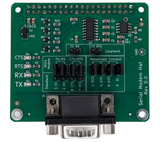
Description:
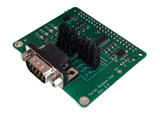
This Raspberry Pi Hat was designed for those who need a flexible serial UART connection with another device. The male DB9 connector provides a full RS232 hardware interface just like older PCs used to.
Specifications:
- Transceiver: ICL3232CBNZ
- Max Power Consumption: 20mA at 3.3v
- Max Speed: 250kbps
- Full Duplex (RX and TX)
- RTS/CTS Hardware Handshaking supported
- Works on Pi3, Pi4, and Pi5
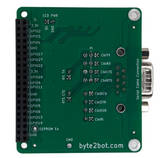
The jumpers allow various configurations without changing any other hardware.
- Loopback (TX and RX connected together, so what is sent is automatically received)
- Null Modem (TX and RX swapped on the board. Useful for straight-through cables)
- Straight Through (This is useful when you have a null-modem cable)
- Handshaking
- CTS and RTS can be configured as straight through, or they can be swapped.
- Cable DCD, DTR,DSR, and RI can be connected in any configuration
Included Items
The hat comes with 11mm M2.5 standoffs, screws, and nuts. Serial cables are available separately.
The included instructions are available here:
Serial Hat Included Instructions
Usage
To use the serial port, make sure it is enabled.
sudo nano /boot/firmware/config.txt
or
sudo nano /boot/broadcom/config.txt
Then make sure the following lines are in the file. If the items are off or set to 0, turn them on or to set to 1:
enable_uart=1

dtparam=uart0=on
Save the file and exit. It may not be necessary, but you can add your username to the dialout group to get around permission problems:
sudo usermod -aG dialout $USER
Once enabled, simply use "ttyAMA0" as the port name instead of "COM1" when opening the port. Most Python or C source code on the internet should support that method. Source code in C++ is available on GitHub. Simply search for "Byte2Bot".
-
 $34.99
 -
 $34.99
 -
$29.99